Thursday, February 3, 2022

ZX81 ULA


The ZX81 was a nice and cheap home computer from the 80's.
It's quitte impossible to find a real ZX81 today as its price has become unrealistic.
Today, anyone can build its own ZX81 as it is easy to find clones. But, in most cases these remakes uses the real ULA chips.
Alwin Henseler has reimplemented the original ULA design in 2012, based on a Xilinx CPLD.

This implementation was exacly the missing piece of hardware I needed for my own ZX81 clone.
Because there was no PCB, I decided to make it.

So, the ZX81_ULA_PCB.zip contains all the necessary files to create your own ZX81 ULA PCB (schematics, board and gerber files are included).

To program the CPLD, please refer to the package. It contains everything you need and of course the zx81_ula.jed programming file.

Note
I deliver the original ULA implementation package from Alwin Henseler because his website does not exist anymore.


Have fun !
Buzz


ZX81_ULA_PCB

Package

Friday, December 10, 2021

Allegro 5 Code::Blocks setup

This ticket shows the important steps to configure Code::Blocks with Allegro5 support.

Requirements

* Code::Blocks 20.03

* MSYS2 framework

* Allegro 5 (MSYS64 package)

* Windows 10

Code::Blocks tabs

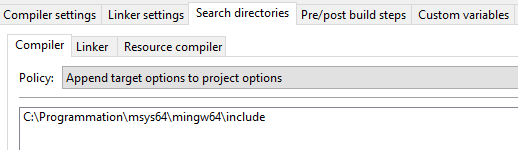
Just add the following lines as in the different screenshots.


Useful links

Allegro tutorial

https://github.com/liballeg/allegro_wiki/wiki/Quickstart

MSYS2

https://www.msys2.org/

https://www.devdungeon.com/content/install-gcc-compiler-windows-msys2-cc

Code::Blocks

https://www.codeblocks.org

Friday, July 9, 2021

SDL2 Code::Blocks setup

This ticket shows the important steps to configure Code::Blocks with SDL 2 support.

Requirements

* Code::Blocks 20.03

* MSYS2 framework

* SDL 2.0 (MSYS64 package)

* Windows 10

Code::Blocks tabs

Just add the following lines as in the different screenshots.


Useful links

MSYS2

https://www.msys2.org/

https://www.devdungeon.com/content/install-gcc-compiler-windows-msys2-cc

Code::Blocks

https://www.codeblocks.org


Saturday, March 27, 2021

Launcher for RC2014 Colevovision system

Version:  27/03/2021

This small module is used to easily launch Coleco roms on a RC2014 system.
It is based on a arduino mini associated to a OLED display and a few buttons.
The goal is to communicate with the RC2014 to get the list of files stored on the SDCard
and send the right commands to the target to perform loading.
The only necessary actions from the user point of view is to power on the system, select the file with simple
up & down buttons, then push the load buttons to perform loading.
That's it.

The simple module cannot work alone. A fully configured RC2014 Colecovision system is required.

SN76489 Sound Card for RC2014: https://github.com/jblang/sn76489
TMS9918A Video Card for RC2014: https://github.com/jblang/TMS9918A
Game Controller Board for RC2014: https://github.com/jblang/GameController
z80ctrl for RC2014: https://github.com/jblang/z80ctrl
z80ctrl CPU/RAM/CTC) for RC2014: https://github.com/jblang/z80ctrl (z80ram directory)
SC112 V1.0 Modular backplane: https://smallcomputercentral.wordpress.com/sc112-modular-backplane-rc2014/

All the needed information to build and configure your own Colecovision system is described here:
https://github.com/jblang (z80ctrl & TMS9918A sections).

All RC2014 extra boards are documented here:
https://smallcomputercentral.wordpress.com (Projects & Documentation sections).

Description

Hardware

* Fully assembled RC2014 Colecovision system (see above)
* Arduino mini Pro 16MHZ/5V
* 128x64 OLED I2C display
* 3x push buttons
* Cable with 6 pin headers.

Connections (described in Control.cpp file) are:
* Buttons
 Arduino A0  -> Select button -> GND
 Arduino A1  -> DOWN button -> GND
 Arduino A2  -> UP button -> GND

* Display
 Arduino A4  ->   OLED SDA
 Arduino A5  ->   OLED SCL
                 OLED GND
 Arduino VCC -> OLED VCC (5v)
 Arduino GND -> OLED GND

* Z80CTRL (JP5)
 1: GND      - Arduino GND
 3: NC
 5: VCC      - Arduino VCC
 7: RX       - Arduino TX
 9: TX       - Arduino RX
 11: AVRRSTn - Arduino DTR

Firmware

The source code (27/03/2021) is included into this package (src and include directories).
It as been compiled with Visual Studio Code for the Atmega328 16MHz 5V target.

The following libraies are necessary:
Adafruit BusIO
Adafruit GFX Library
Adafruit SS1306

The following picture is showing Dig Dug, running on the RC2014 system (ColecoLauncher is not connected yet. Simple terminal is used instead).


The above picture is showing the connection between the RC2014 system and the ColecoLauncher.

RC2014 jumpers

Game Controller Board

SN76489 Sound Card

TMS9918A Video Card

z80ctrl Card


Have fun !
Buzz

Package

Sunday, October 20, 2019

Tombstone City for ZX Spectrum


Version: 2019/10/20 - Morroco

Once again, this is a new remake of my favorite game : Tombstone City.
After adapting and porting it to different operating systems (Windows, Linux, Nintendo DS) 
and several graphics libraries (Allegro, SDL, PA LIB, SFML), I decided to make something special:
Mixing TI99/4A and ZX Spectrum worlds.
This is now done.

So, this Tombstone City game implementation runs on Sicair ZX Spectrum.
I ran it on two emulators (My own version and EightyOne) but not on a real target yet.

Features
Sinclair ZX Spectrum 48K target
Built with z88DK win32 SDK (/www.z88dk.org), using SDCC + newlib
Sources, TAP and SNA files available

Keys
S : Left
D : Right
E : Up
X : Down
Y : Fire/Start
P : Pause
0 : Restart
SPACE : Panic

Have fun !
Buzz
 

Thursday, November 22, 2018

Tombstone City for Windows


Build : 22 Novembre 2018
SFML 2.5.0 Windows - GCC 5.1.0 TDM (SJLJ) - Code::Blocks - 32-bit(https://www.sfml-dev.org/)


Here comes the new version of my Tombstone City game implementation for Windows 32 - SFML 2.5.0.

I have already made this game a couple of time for different hosts with different libraries (Nintendo DS - PAlib-070717 in 2009-2011, Linux - SDL-1.2 in 2010).

If you have never played this game before or you need more information, you may have a look at :

http://www.videogamehouse.net/tombstone.html


This new version, like the others, includes the binary and the source code.


How to play

Just launch the binary and play !

Keys

Left, Right, Up, Down keys to move
Q to fire
Enter or Q to play
P to pause the game
Escape to quit

Have fun !

Buzz

Package


Thursday, October 4, 2018

Pong 2017


Version : 29-04-2017

This is a new version of the Pong console.


If you do not know what it is look at the previous ticket (Pong - Renaissance) or at the following Wikipedia web page https://en.wikipedia.org/wiki/Pong.
This new version is identical to the previous one with a better and smaller PCB. 
All the components are the same.

Have fun !

Buzz

Package


GPS 4 car

Version: 25/04/2024 This application, recently installed in my NISSAN Patrol, can display: Speed, Cap, Altitude, Time and Date. It is based ...